 highghlow
* terms and conditions apply
Navigate to the part you need using the Table of contents below. Important steps are **highlighted**.
Table of contents:
On the Desktop
Most of your advertisement watching happens through the web browser, so it's a good place to start blocking them.
Chrome/Edge
Chrome is working against you when it comes to blocking ads (because, of course, Google is an ad company). This means that if you want to keep using it, you'll have to fight it. So, if you can,
Switch to Firefox
Or, if you don't want to / can't,
- Install uBlock Origin Lite
- Switch the "filtering mode" to complete
- Proceed to Tuning uBlock Origin
Hovewer, be aware that Chrome will disable the extension periodically to "improve security", which is funny considering the multiple times they've put literal malware in their ads, but I digress.
Firefox
Unlike chrome, firefox does not fight you (at least for now), so just
- Install uBlock Origin
- Proceed to Tuning uBlock Origin
And that's it. You will never have to tweak the settings or re-enable the addon ever again.
Brave
I personally really dislike brave, but I have to mention that it includes and ad-blocked by default. I don't know how good it is, I recommend Firefox.
System-wide
I personally don't use system-wide ad blocking, os can't provide my own guide here, but here's what I can recommend:
- Techlore's guide on NextDNS — Recommended for most users. Freemium, non-selfhostable
- Pi-hole — Recommended for nerds. Free, open-source, requires self-hosting
- FUTO's guide on pfBlockerNG — Recommended for extreme nerds. Free, open-source, requires a custom router
On Android
Chrome/Edge
Unlike the desktop, it simply cannot be done. Chrome on Android does not support extensions and never will.
Switch to Firefox
Or, if you don't want to / can't,
Use system-wide blocking described below
Firefox
Firefox support extensions on Android, and so you can just
-
Install uBlock Origin
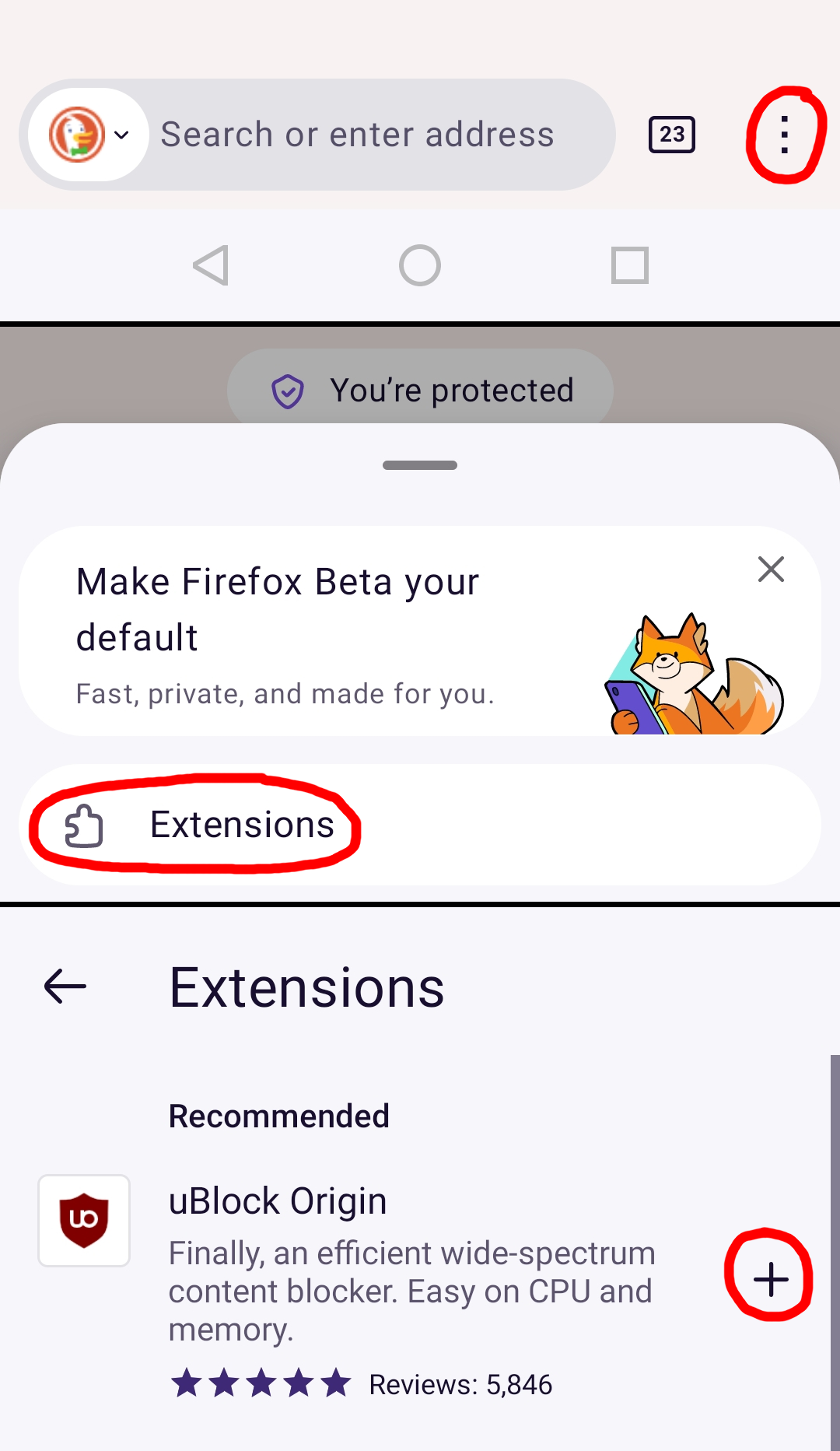
- Proceed to Tuning uBlock Origin
System-wide blocking
As you probably use your phone outside your home, you will not be able to connect to self-hosted services, therefore I recommend you
Use NextDNS (follow Techlore's guide)
There is also a more advanced (and effective) option:
Use AdAway
But it requires either root access (which you probably don't have) or the ability to run in the background.
On IOS
On IOS your options are limited (because Apple sucks), so the only this I can recommend it
Install AdGuard
Tuning uBlock Origin
Although uBlock Origin does a great job by itself, I recommend installing the HaGeZi Pro++ blocklist. It is really good at blocking ads (I haven't seed a single one in months) and I've never had a false-positive with it, so there is no reason to *not* install it.
- Go to uBlock Origin settings
- Go to the "Filter lists" tab
- Scroll down to the bottom and find "Import..."
- Paste the following url:
https://cdn.jsdelivr.net/gh/hagezi/dns-blocklists@latest/adblock/pro.plus.txt - Click "Apply changes" at the top of the page